
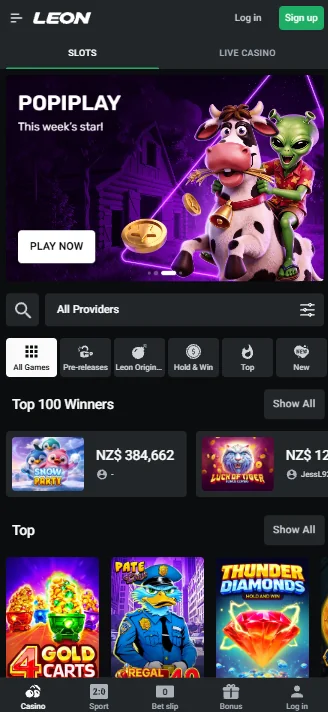
What You Get Inside the LEON Casino App
The full LEON game library is available on any modern smartphone, and browser play needs no extra software or plugins.
This is what you get when installing the LEON Casino app:
More than 12,000 pokies by Pragmatic Play, NetEnt, Play'n GO, Evolution, BGaming, and Penguin King;
Live dealer tables: roulette, blackjack, baccarat, and TV game shows;
Jackpots and crash games: progressive jackpots and instant-win games such as Aviator and Plinko will work great even on small screens;
Sports betting: rugby, football, basketball, cricket, tennis, esports, and more;
Access to all bonuses: welcome bonus, cashback, reload bonuses, loyalty program, Free Spins, Free Bets, and other active promotions in real time.
Everything from your account information, balance, bet history, and bonus balance are synchronized across devices. Start playing on the computer, continue on your smartphone, the gaming experience will be the same.
How to Download and Install the LEON Casino Android APK
The LEON Casino app download is available directly through the official website as an APK file. This method is quite popular for the gaming industry and there is nothing to worry about as long as you follow the guide provided below, step by step.

Here's how it works in five easy steps:
Access your phone's browser and visit the official website of LEON Casino New Zealand.
Tap the “Download” button in the app banner of the website, after that, the LEON Casino Android APK file begins downloading automatically.
You may be asked to allow installation from unknown sources. This option means that the file is not from Google Play and is quite common for Android devices. To get access, go to the Install Unknown Apps setting (its exact place depends on your Android version) and enable this option for your browser.
Open the downloaded file on your notifications screen or Download tab and tap Install. Takes a few seconds.
Start the LEON Casino app and sign up/log in to your account, your app icon will appear on the home screen.
Once your installation is done, you can disable the unknown sources feature, the app will continue to work the same.
How to Add LEON Casino to Your iPhone or iPad
For iOS devices, no downloads are required. Go to the LEON Casino website using Safari or any other mobile browser on your mobile device and tap "Share", then click the "Add to Home Screen" button. It will create a home-screen shortcut to the LEON website, and your games, account and bonuses stay in sync because it is the same account.
The Bonus You Get Just for Installing
LEON Casino offers an extra reward for app users. Install the Android APK file, log in and opt in on the promotion page inside the app to receive 50 Free Spins on Shaolin Panda Chaos Reels from Penguin King.
This offer is activated with the “Opt-in” button rather than a bonus code, and the LEON Casino app download itself is free. Winnings from the spins must be wagered 20x on the same game within 7 days.
This is an app-only bonus. iOS users have access to the game lobby and promotions through the website, but this particular offer is tied to the Android app download only.
How Your Data and Money Stay Protected
Each session on the LEON Casino app uses SSL encryption, so the user’s login details, personal information, and transactions are encrypted in transit.
LEON Casino NZ is licensed by the Government of the Autonomous Island of Anjouan, Union of Comoros, under Licence No. ALSI-202410001-FI1.
Additional security features:
- KYC verification prior to the withdrawal: users provide a national ID card, passport or driving licence, and further documents such as a utility bill may be requested;
- Each player only has one account.
Only the official LEON Casino APK can be downloaded from the official website. Third-party downloads of the application may contain viruses and should not be installed.
Deposits and Withdrawals Through the App
This LEON Casino application allows you to use all the payment methods offered on the desktop version of the site. Depositing money or withdrawing winnings on your phone will not take more time than it takes on your computer.
Let’s start with deposit methods and how each one performs:
| Method | Max Deposit | Speed |
|---|---|---|
| Bank Cards (Visa / Mastercard) | NZ$9,500 | Instant |
| Skrill | N/A | Instant |
| MiFinity Wallet | NZ$4,000 | Instant |
| Crypto (ETH/USDT) | NZ$180,000 | Instant |
Minimum deposits are shown for each method in the cashier.
Getting money from LEON is pretty straightforward. The processing time differs depending on the method chosen, with Skrill and cryptocurrencies being the quickest ways to get your funds. The figures below are per-transaction ceilings for each method — the most you can move in a single withdrawal.
This is what you can expect when you cash out:
| Method | Min Withdrawal | Max Per Transaction | Speed |
|---|---|---|---|
| Skrill | NZ$10 | NZ$4,500 | Instant |
| Crypto (USDT) | NZ$40 | NZ$3,600 | 1-2 hours |
| Crypto (other) | Varies | Varies | 1-2 hours |
Withdrawal limits are also tiered based on your cumulative deposit history: each tier has its own weekly and monthly cap, and the caps rise from new accounts to high-value and VIP accounts.
Playing Responsibly on Mobile
Responsible gambling tools are built into the LEON Casino app — the same ones available on desktop, accessible from your account settings.
Here’s a quick look at features that are available at LEON:
Deposit limits: set daily, weekly, or monthly caps on how much you can deposit;
Wagering limits: set limit caps on the total amount you can wager;
Self-exclusion: set your deposit limit to zero for six months (temporary) or indefinitely (permanent) to restrict your own account access.
If gambling stops being enjoyable, the Gambling Helpline of New Zealand offers a free 24-hour helpline on 0800 654 655, and our responsible gambling page explains every tool. You can also reach out to our support team at any time — whether you'd like help setting deposit limits, taking a break, or simply talking through your options, we're here around the clock to point you in the right direction.
FAQ
Is the LEON app free to download?
Yes. The LEON Casino app download is completely free. There are no charges to install the Android APK or to add the website to an iPhone home screen. You only spend money when you make a real money deposit inside the app.
Why can’t I find the app on the Google Play Store?
LEON offers its Android app as an APK on the official website rather than through a store listing, and store apps that carry a similar name are not linked from the official site. Download it only from LEON's own website.
Do I need a separate account for the mobile app?
No. You don't have to do that. Your existing LEON account works across all platforms, desktop version, mobile app, and browser. Everything, from balance, bets, bonuses, to verification status, syncs in real time and stays the same.
Will the app use a lot of my mobile data?
No. Pokies and casino games typically do not require much internet data to play. However, live dealer broadcasts and live sports betting demand more data. In such cases, a good Wi-Fi connection or 4G is highly advised.
Can I withdraw my winnings through the app?
Yes. All withdrawal options on the desktop are the same within the application. Visit the cashier section, select a payment option, enter the amount of money you would like to withdraw and proceed. Don't forget that KYC verification is required prior to your first cashout.